> ## Documentation Index
> Fetch the complete documentation index at: https://docs.contributor.info/llms.txt
> Use this file to discover all available pages before exploring further.
# Workspaces
> Group repositories, track activity across projects, and get a single dashboard for everything your team maintains.
Workspaces is a paid feature. [Sign up](https://contributor.info) to get started.
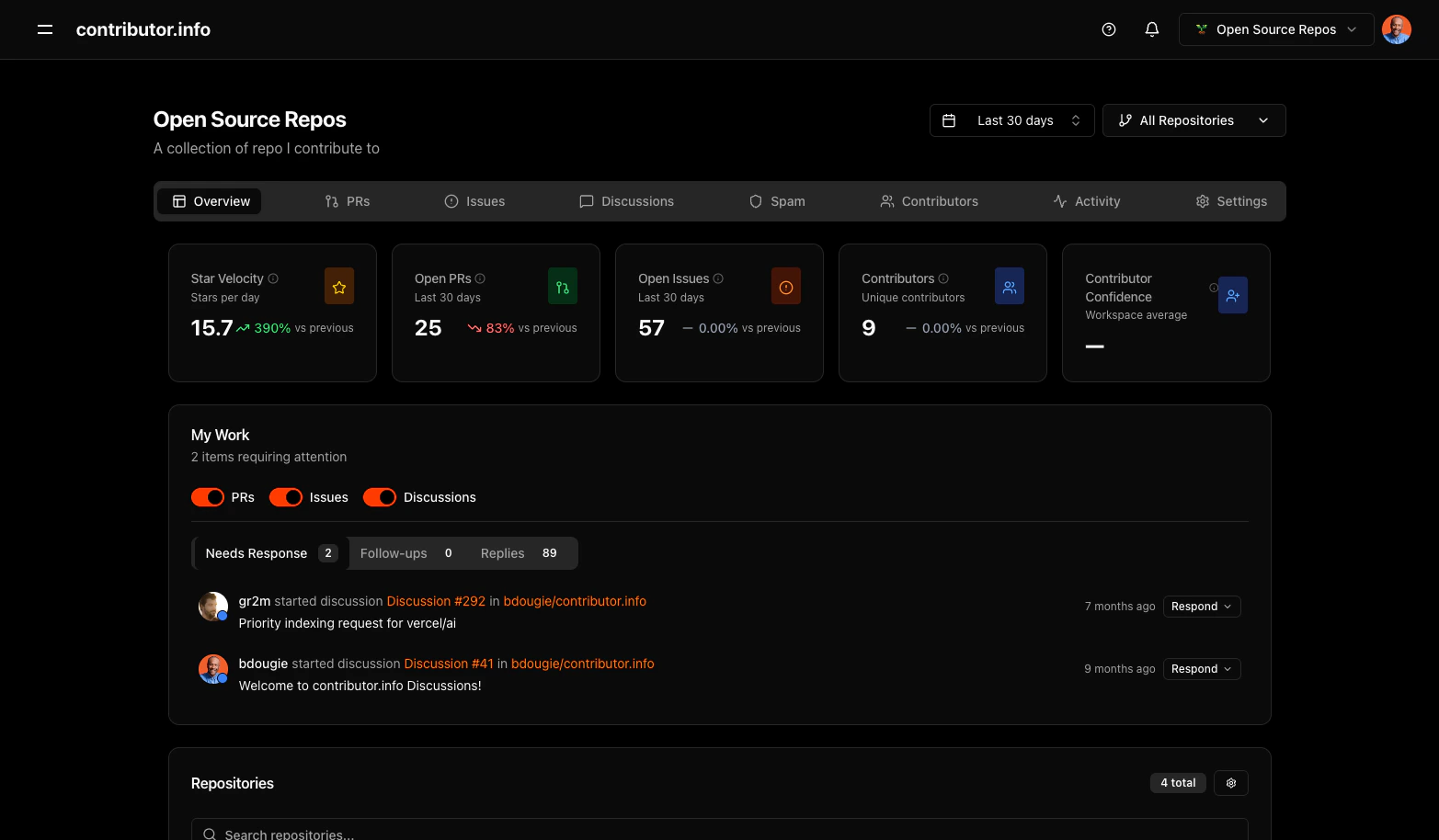
Workspaces let you group related repositories into a single dashboard. Instead of analyzing repos one at a time, you see aggregated metrics — star velocity, open PRs, contributor count, and confidence scores — across every project in the workspace.
 ## What you get
| Feature | Description |
| ------------------------- | --------------------------------------------------------------------------------------------------------------- |
| **Aggregated metrics** | Star velocity, open PRs, open issues, unique contributors, and contributor confidence averaged across all repos |
| **My Work** | Items needing your response — PRs, issues, and discussions — in one feed |
| **Repository management** | Add, remove, and search repos within your workspace |
| **Tab navigation** | Overview, PRs, Issues, Discussions, Spam, Contributors, Activity, Settings |
| **Time range filtering** | Last 30 days, 60 days, 90 days — applied across all repos |
## Creating a workspace
1. Sign in with GitHub
2. Click the workspace selector in the top navigation
3. Select **Create Workspace**
4. Name it and add repositories
## Use cases
**Open source maintainers** — Group all projects you maintain into one workspace. See which repos need attention without checking each one individually.
**Engineering teams** — Track your team's repositories together. Monitor PR velocity, review coverage, and contributor growth in one view.
**Community managers** — Watch contributor activity across an ecosystem of related projects. Spot trends and recognize active contributors.
## What you get
| Feature | Description |
| ------------------------- | --------------------------------------------------------------------------------------------------------------- |
| **Aggregated metrics** | Star velocity, open PRs, open issues, unique contributors, and contributor confidence averaged across all repos |
| **My Work** | Items needing your response — PRs, issues, and discussions — in one feed |
| **Repository management** | Add, remove, and search repos within your workspace |
| **Tab navigation** | Overview, PRs, Issues, Discussions, Spam, Contributors, Activity, Settings |
| **Time range filtering** | Last 30 days, 60 days, 90 days — applied across all repos |
## Creating a workspace
1. Sign in with GitHub
2. Click the workspace selector in the top navigation
3. Select **Create Workspace**
4. Name it and add repositories
## Use cases
**Open source maintainers** — Group all projects you maintain into one workspace. See which repos need attention without checking each one individually.
**Engineering teams** — Track your team's repositories together. Monitor PR velocity, review coverage, and contributor growth in one view.
**Community managers** — Watch contributor activity across an ecosystem of related projects. Spot trends and recognize active contributors.